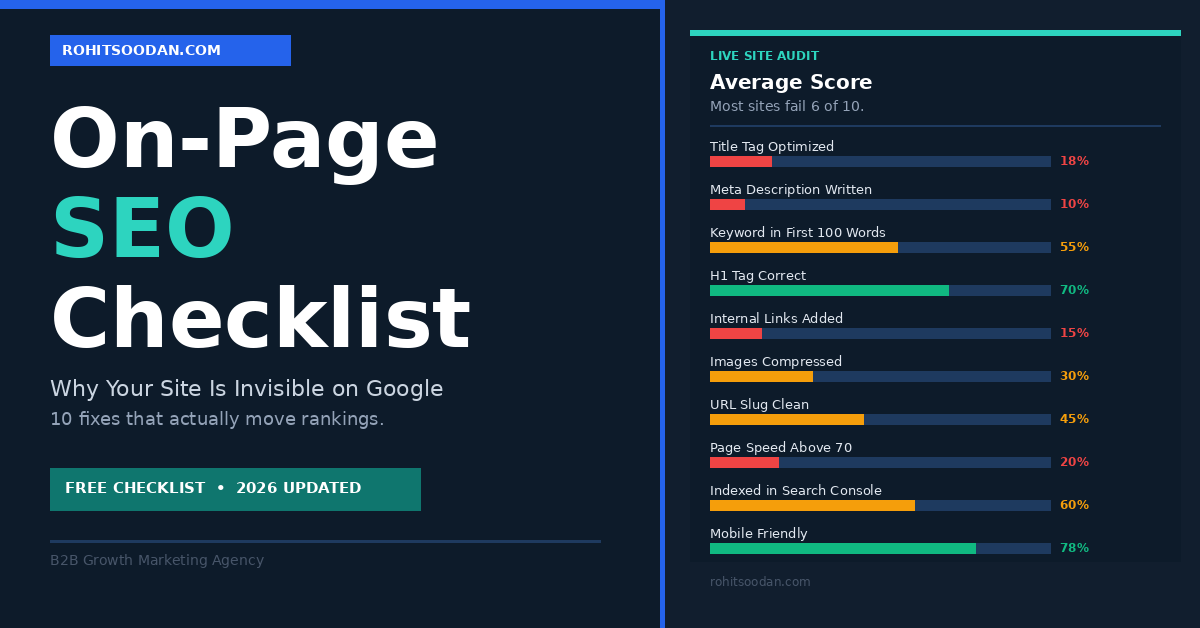
Let me guess. You have read at least three articles about search engine optimization tips. You installed Yoast or RankMath on WordPress, saw the satisfying green light appear on your post, and hit publish. Then you opened Google, typed your keyword, and found your site somewhere around page four, sitting quietly between a 2019 blog post that has not been updated since and a forum thread nobody has replied to in two years.
The green light lied to you. Or more accurately, you thought the green light meant the job was done. It meant the minimum requirements were met. Minimum requirements and ranking on page one are not the same thing, and most SEO tools are not designed to tell you that.
Here is what nobody in the SEO content industry wants to admit: most sites are not ranking because of a handful of fixable on-page mistakes that take less than an hour to address per post. Not because of a mysterious algorithm, not because of bad luck, and not because their competitors have some secret. Because they skipped the fundamentals.
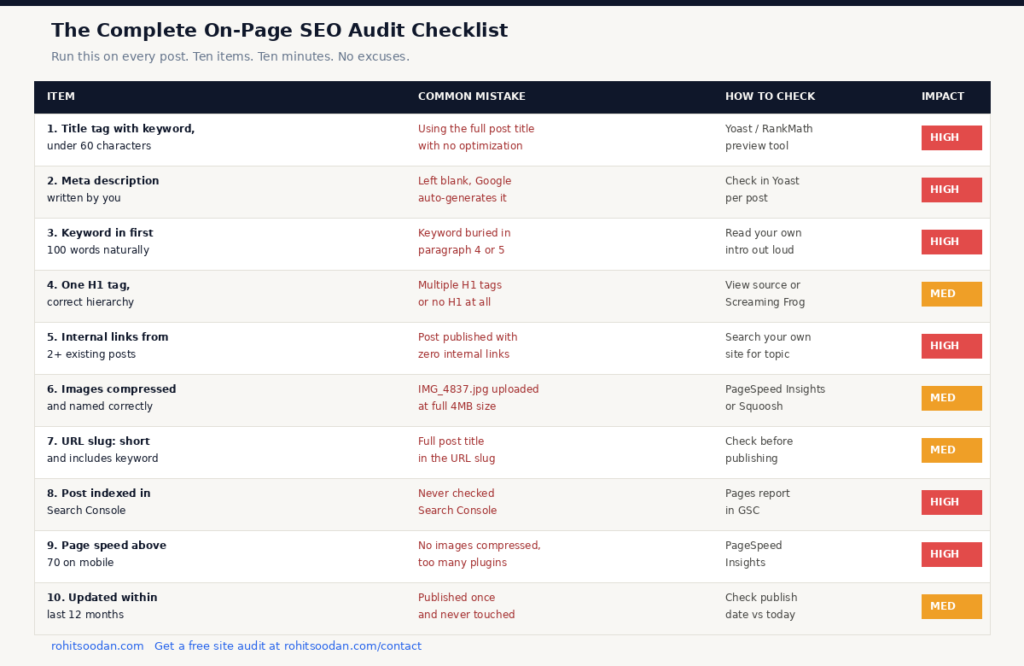
This is the checklist. Run it on every post you have published and every post you are about to publish. The results will be uncomfortable and then extremely useful.
If you want someone to run this audit on your specific site and tell you where the gaps are, contact me here. I will come back within 24 hours with an honest answer.
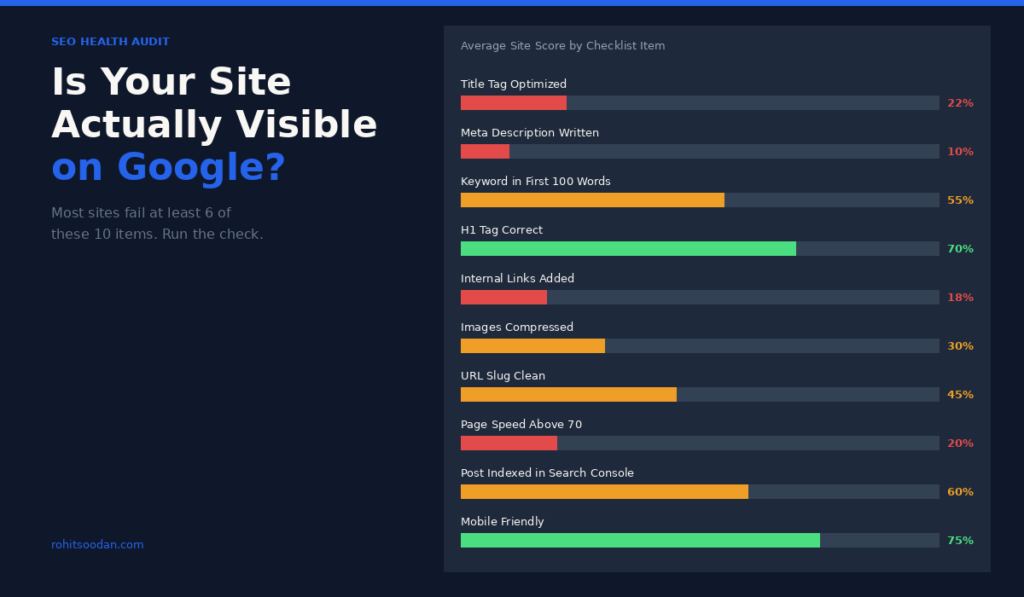
Most sites score badly on at least six of the ten items in this audit. The good news is every single one of them is fixable without a developer, without an expensive tool subscription, and without understanding how search engine algorithms actually work at a technical level. You just have to do the work.
What Is SEO Optimization and Why Are Most Explanations Useless
SEO optimization is the practice of making your website easier for search engines to understand and more genuinely useful for the people searching for what you offer. That definition is correct and also tells you almost nothing actionable.
Here is the version that actually helps. Search engines have one job: show the user the most relevant, trustworthy, well-presented answer to their query. Every ranking factor Google uses is in service of that one objective. When your site does not rank, it is because Google has decided: correctly or incorrectly, that your page is not the best answer to the query you are targeting.
On-page SEO is everything you control directly on your own website. Title tags, headings, internal links, image compression, page speed, URL structure, all of this is on-page. Off-page SEO is what other websites do for you: backlinks, brand mentions, domain authority accumulated over time. Most sites have not finished their on-page work and are already worried about building backlinks. That is like repainting the exterior of a house before you have fixed the leaking roof.
On-page SEO always comes first. Always.
The Search Intent Problem Nobody Talks About Honestly
Before we get into the technical checklist, there is a conceptual mistake that kills more rankings than any technical issue and it cannot be fixed by any plugin.
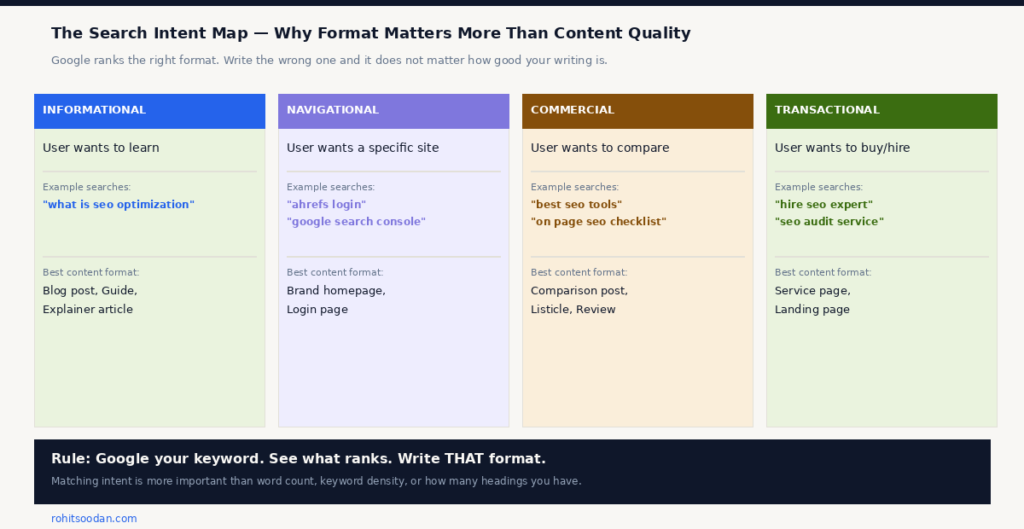
Search intent is the reason someone performs a search. Google has spent years analyzing billions of searches and has become extraordinarily good at understanding what a user actually wants when they type a specific phrase. When Google decides what to rank, it is not just looking for the page that mentions the keyword most helpfully. It is looking for the page that matches the format the user wants.
Here is the practical problem this creates. You write a thoughtful, well-researched blog post targeting the keyword “best seo tools.” You spend three hours on it. You optimize the title, you compress the images, you add internal links. And it still does not rank. Because when someone searches “best seo tools,” they want a comparison. They want a table. They want pricing. They want to make a decision quickly. Google has seen this pattern millions of times and consistently serves comparison pages, not blog posts.
Your blog post, no matter how good, is the wrong format for that intent. And Google will not rank the wrong format regardless of how well optimized it is.
The diagnostic is simple: Google your target keyword before you write anything. Look at what is ranking on page one. Is it blog posts? Comparison tables? YouTube videos? Product pages? Whatever is there is what Google has decided users want. Write that format or choose a different keyword.
The On-Page SEO Checklist
Title Tag: The Most Important Element You Are Probably Getting Wrong
Your title tag is the blue clickable headline that appears in Google search results. It is the single most important on-page SEO element on any page and the one most consistently treated as an afterthought.
A title tag that works in 2026 does three things. It contains your target keyword toward the beginning. It stays under 60 characters so it does not get truncated in search results. And it gives someone a reason to click rather than scroll past.
“SEO Tips” is a title tag. It is also doing absolutely nothing for you.
“The On-Page SEO Checklist 90% of Site Owners Skip” is a title tag. It names the format the user is looking for, implies they are probably making mistakes, and creates just enough curiosity to earn the click. Click-through rate on your title tag affects how often Google shows your result. Higher clicks over time signal that your result is genuinely useful and Google rewards that with more visibility. Getting the title right is a compounding advantage that starts the moment you fix it.
Meta Description: Stop Letting Google Write It For You
The meta description is the two-line summary below your title in search results. Google does not use it as a direct ranking factor. It is however a conversion element, it determines whether someone who sees your result actually clicks on it or keeps scrolling.
When you leave it blank, Google pulls a random sentence from your post. That sentence usually has no context, no reason to click, and sometimes ends mid-phrase because the character limit cuts it off.
Write your own. Keep it between 150 and 160 characters. Include your keyword naturally. End with a reason the click is worth making. Think of it as a two-sentence advertisement for your article.
Keyword Placement: The 100 Word Rule
Your target keyword should appear within the first 100 words of your post. Not hidden, not forced, naturally as part of the opening paragraph. This tells Google very early in its crawl what the page is about and signals that the keyword is genuinely central to your content rather than something you sprinkled in after the fact.
This is not the same as keyword stuffing. Keyword stuffing is a 2010 problem and it actively hurts rankings now. The goal is one clear natural appearance of your keyword in the opening section and then a handful of natural appearances throughout the rest of the content alongside related terms and synonyms. If your article is genuinely about the topic, the keyword will appear naturally at roughly the right frequency without you having to count anything.
Heading Structure: H1 H2 H3 in the Right Order
Every page should have exactly one H1, which is your main title. H2 headings break the content into main sections. H3 headings create subsections within those sections. This hierarchy helps search engines parse your content structure and understand what is important relative to everything else on the page.
Common mistakes: multiple H1 tags on the same page, jumping from H2 directly to H4, using heading tags purely for visual styling rather than actual content organization. Check every post you have published. Most people are doing at least one of these things and have no idea.
Internal Links: The Most Powerful Free SEO Tool Nobody Uses
Internal links are hyperlinks that connect one page on your site to another. They are one of the highest-impact on-page optimizations available to every site owner regardless of budget and one of the most consistently ignored.
A post that sits completely alone with no internal links pointing to it looks like an island to a search crawler. It has no context, no authority flowing into it, and no signal that it matters relative to other content on your site.
Every new post you publish should be linked to from at least two existing posts. And every new post should link out to two or three relevant existing pages. This takes ten minutes per post. Most people skip it because there is no plugin giving them a score for it.
Image Optimization: Why Your Pages Are Loading Slowly and Ranking Poorly
Images are the most common cause of slow page speed on content sites, and slow pages lose rankings. An image that is 4MB when a 200KB compressed version looks identical is costing you ranking positions every single day it remains on your server.
Before uploading any image: compress it using Squoosh or TinyPNG. Rename the file descriptively before it goes into WordPress. “IMG_4837.jpg” communicates nothing to a search engine. “on-page-seo-checklist-example.jpg” communicates exactly what the image depicts. Add alt text that describes the image and where natural includes a relevant keyword.
These are not advanced SEO tactics. They are basic practices that a significant percentage of published sites have never implemented.
URL Slug: Short Clean and Keyword Included
Your URL slug should be short, descriptive, and contain your target keyword. WordPress by default often creates slugs that include the full post title including every word. Clean it up before you publish because changing a URL after publication creates redirect issues that most site owners handle incorrectly.
“rohitsoodan.com/on-page-seo-checklist” is a URL that works.
“rohitsoodan.com/the-on-page-seo-checklist-that-actually-tells-you-why-your-site-isnt-ranking-2026-updated” is a URL that will be truncated in search results and looks like it was generated by someone who has never thought about this before.
Keyword in the slug, nothing else unnecessary. That is the entire rule.
The Technical Items That Cannot Be Ignored
Indexing Status in Google Search Console
Before you do anything else, confirm that your posts are actually indexed. Open Google Search Console, go to the Pages report, and check the status of your recent posts. “Discovered, currently not indexed” means Google has found the page and chosen not to add it to its database. A post that is not indexed cannot rank for anything regardless of how well optimized it is.
Request indexing manually through the URL Inspection tool. Then wait. Then check again. This is the most overlooked step in the entire publishing process and it is free and takes two minutes.
Page Speed and Mobile Friendliness
Google uses mobile-first indexing. The mobile version of your site is what it primarily evaluates when deciding where to rank you. A site that looks good on a laptop but loads slowly on mobile is being evaluated in its worst state.
Run your URL through Google PageSpeed Insights. Aim for a score above 70 on mobile. The most common issues are uncompressed images, too many plugins loading scripts on every page load, and render-blocking JavaScript. None of these require a developer to diagnose or fix.
Content Freshness: When Did You Last Update Your Posts
Freshness is a ranking signal, particularly for topics that change over time. A post about SEO best practices written in 2022 and never updated is competing against posts that reflect the current algorithm, current tools, and current best practices. The outdated post consistently loses.
Revisit older posts that have dropped in rankings. Update the data points. Add new sections where the landscape has changed. Republish with a new date. This alone can revive posts that have quietly slipped from page two to page five.
How to Improve SEO Once the Checklist Is Done
Completing this on-page SEO checklist is the foundation, not the finish line. Once your on-page work is solid the next layer is building topical authority, publishing multiple connected posts on the same topic so Google recognizes your site as a genuine source of expertise rather than a collection of isolated articles.
The sites that rank consistently are not the ones that publish the most content. They are the ones that publish the most useful, well-structured, internally connected content on a focused set of topics. One pillar post supported by eight interconnected supporting posts will outperform eight isolated posts every time.
And here is the thing about search engine optimization that most how-to content is too polite to say. It takes time. Not months of waiting and hoping, months of consistently doing the right things. Publishing well-optimized content. Building internal links. Updating older posts. Slowly earning backlinks from other sites in your space. There is no shortcut and there is no tool that replaces this work.
The businesses that understand this turn SEO into a compounding asset. Every well-optimized post you publish today is still working for you in three years. Every shortcut you take today is a problem you will deal with in three months.
Before Your Next Post Goes Live
Run through this before you hit publish. If you cannot check all of these, fix them first and publish second.
Keyword appears naturally in the title tag and it is under 60 characters. Meta description is written by you and sits between 150 and 160 characters. Target keyword appears in the first 100 words. There is one H1 and only one. H2 and H3 headings create a logical structure throughout. At least two existing posts link to this new post. This post links out to at least two relevant existing posts. All images are compressed and named descriptively with alt text. URL slug is short and includes the target keyword. Post has been submitted for indexing in Google Search Console.
Ten items. Ten minutes. All of them matter more than hitting a word count target or achieving a keyword density percentage that a plugin told you to care about.
If you went through this and you are still not sure what is holding your site back, fill in the contact form here. Tell me your website and your main goal and I will give you an honest answer within 24 hours.